
Editor's pick: EI ALGOS scores each trade setup on a six-factor behavioral engine and gives you personalized process feedback through its LIANA assistant. That makes it the strongest fit for self-directed traders who want to improve decision quality, not just log P&L.
If your needs differ, here are the top alternatives at a glance:
- Tradervue — mature multi-asset journal with automatic entry/exit charts and broad broker sync
- TraderSync — widest broker import list with solid mobile/web workflow
- TradesViz — leg-level options and futures visualization with per-leg P&L breakdowns
- Edgewonk — deep customization, mistake-tagging, and behavioral analysis
- Stonk Journal — free, beginner-friendly, no broker auto-import required
The comparison table below shows how all ten journals stack up on the dimensions that matter most. Individual reviews follow, then a buying checklist and methodology note so you can replicate the evaluation yourself.
Table of Contents
- What are the best trading journals side by side?
- Why EI ALGOS is the editor's pick for process-driven traders
- Tradervue: a mature, multi-asset journal with strong reporting
- TraderSync: best for broad broker import and mobile workflow
- TradesViz: best for options and futures leg-level analysis
- Edgewonk: best for customization and behavioral tagging
- TradeZella: best for community insights and peer learning
- How do you choose the right trading journal for your workflow?
- Why one-size-fits-all journals fail active traders
- Protecting your trade data: backup and disaster recovery
- Key Takeaways
- The metric most traders ignore until it costs them
- EI ALGOS scores your decisions, not just your trades
- Useful sources and further reading
What are the best trading journals side by side?
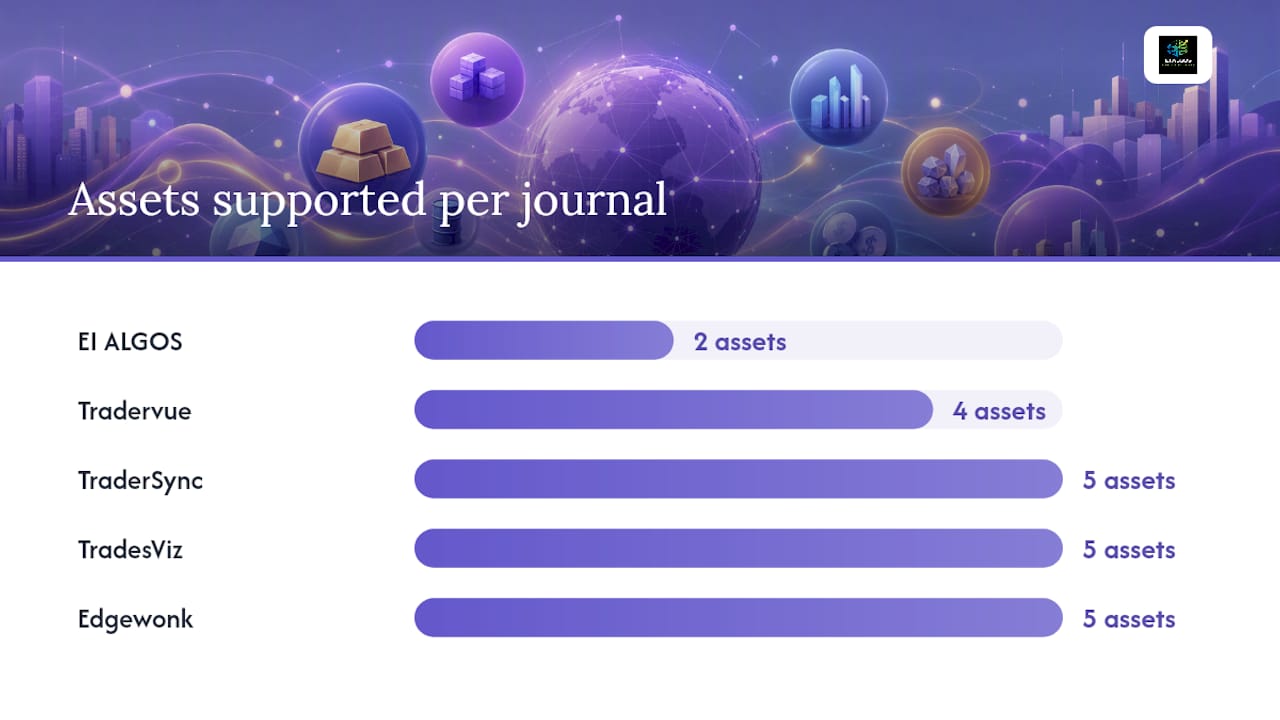
| Journal | Best For | Assets | Broker Import | Analytics Depth | Mobile | Pricing | Data Export |
|---|---|---|---|---|---|---|---|
| EI ALGOS | Decision-process improvement, options traders | Stocks, options | CSV, manual | Six-factor behavioral scoring, LIANA AI, options analysis | Web | Free tier; paid tiers (monthly/annual) | Yes |
| Tradervue | Multi-asset traders wanting mature reporting | Stocks, options, futures, forex | Auto-import, CSV, broker sync | Auto charts, multi-asset reports, expectancy | Web | Free tier; paid plans | Yes |
| TraderSync | Multi-broker users, mobile-first traders | Stocks, options, futures, forex, crypto | Large broker list, auto-import, CSV | AI assistant, per-setup metrics, strike rate | iOS, Android, web | Free tier; paid plans | Yes |
| TradesViz | Options and futures, leg-level analysis | Stocks, options, futures, forex, crypto | CSV, broker sync, TradingView | Leg-level P&L, chart overlays, multi-instrument | Web | Free tier; paid plans | Yes |
| Edgewonk | Customization and behavioral tagging | Stocks, options, futures, forex, crypto | CSV, manual | Custom templates, mistake tagging, return forecaster | Desktop/web | Paid only (one-time or subscription) | Yes |
| TradeZella | Community learning and peer feedback | Stocks, options, futures, forex | CSV, broker sync | Per-setup metrics, community feeds | Web, mobile | Free tier; paid plans | Yes |
| Stonk Journal | Beginners, manual entry, zero cost | Stocks | Manual entry | Basic P&L, simple reports | Web | Free (donation-supported) | Limited |
| Trademetria | No-frills P&L tracking, budget-conscious | Stocks, options, futures, forex | CSV, broker sync | Basic reports, P&L tracking | Web | Free tier; paid plans | Yes |
| WingmanTracker | Specialized workflow traders | Stocks, options | CSV, manual | Focused workflow metrics | Web | Paid plans | Yes |
| RizeTrade | Mid-market SaaS alternative | Stocks, options, futures | CSV, broker sync | Standard reports, alternative UI | Web | Paid plans | Yes |
Pricing callout: Free tiers exist on EI ALGOS, Tradervue, TraderSync, TradesViz, TradeZella, and Trademetria. Paid plans across the category typically run in the range of single-digit to low double-digit dollars per month on annual billing. Edgewonk operates on a one-time or subscription model with no free tier. Stonk Journal is free and donation-supported.
Two trust signals worth noting: independent roundups use broker auto-import coverage, analytics depth, and pricing transparency as their primary evaluation axes. Vendors that publish clear pricing pages and support CSV import testing during a free trial consistently score higher in third-party reviews. Active social presence, such as Tradervue's StockTwits channel, is a reliable signal of ongoing product development and responsive support.
Why EI ALGOS is the editor's pick for process-driven traders
Most trading journals measure what happened. EI ALGOS measures why it happened. That distinction is what makes it the right tool for self-directed traders whose primary goal is decision consistency, not just a running P&L tally.
The platform's six-factor decision engine scores each setup before and after the trade, evaluating the psychological and behavioral variables that drive outcomes. You get a decision score on every trade, not just a win/loss ratio. The LIANA assistant then surfaces patterns in your behavior, flagging recurring mistakes and reinforcing the habits that correlate with your best setups.
Key features:
- Six-factor behavioral scoring engine on every trade setup
- LIANA AI assistant for personalized process feedback (no generic signals)
- Options analysis and live trade management tools
- Strategy pattern detection across your trade history
- Data export and privacy controls so you own your records
- Free tier available; subscription tiers unlock advanced features and unlimited usage
Pros:
- Scores decision quality, not just outcomes
- Options support with behavioral context
- LIANA provides feedback specific to your patterns, not market-wide signals
- Free tier lets you test the core workflow before committing
Cons:
- Advanced features carry a learning curve for traders new to process-based frameworks
- Broker auto-import is more limited than TraderSync or Tradervue at this stage
- Best value for traders who are already committed to process improvement, not those who just want a P&L log
Pricing follows a tiered SaaS model: a free plan covers the essentials, and paid monthly or annual subscriptions unlock the full analytical suite. Start with the free tier and run a focused 7–14 day trial using your last 20–30 trades to validate fit.
"EI ALGOS positions itself as a Decision Intelligence platform that scores trade setups and offers educational guidance to improve decision-making." — EI ALGOS guide
Tradervue: a mature, multi-asset journal with strong reporting
Tradervue is the most established name in this category. It has been the reference point for broker-import journals for years, and StockBrokers.com's 2026 roundup lists it as a top pick for its powerful analytics and multi-asset support.
The standout feature is automatic chart generation around each entry and exit point, which removes the manual screenshot step most traders skip. Multi-asset coverage spans stocks, options, futures, and forex, and the broker sync list is broad enough to cover most retail setups.
Pros:
- Auto-generated entry/exit charts with no manual effort
- Multi-asset reporting with expectancy and strike-rate metrics
- Broad broker sync and CSV import
- Free tier available for lower-volume traders
Cons:
- UI feels dated compared to newer entrants
- Free tier limits trade volume and some report types
- Less focus on behavioral or process-level analysis
Paid plans unlock full reporting and higher trade volume. The free tier is functional for traders logging fewer trades per month. Tradervue's active presence on community channels is a positive signal for ongoing support.
TraderSync: best for broad broker import and mobile workflow
TraderSync's primary advantage is coverage. It supports one of the largest broker import lists in the category, making it the practical choice if you trade across multiple accounts or brokers and want everything in one place without manual CSV work.
The mobile app (iOS and Android) is a genuine differentiator. You can review trades, add notes, and check your metrics between sessions without switching to a desktop. An AI assistant provides setup-level feedback, though it is less behaviorally focused than EI ALGOS's LIANA.
Pros:
- Largest broker auto-import list in the category
- Full-featured iOS and Android apps
- Per-setup metrics, strike rate, and expectancy reports
- Free tier available
Cons:
- AI assistant is more signal-oriented than process-oriented
- Paid plans are required for the full analytics suite
- Can feel feature-heavy for traders who want a simpler workflow
For a detailed comparison of import depth and analytics trade-offs between TraderSync and Tradervue, see Tradervue vs TraderSync.
TradesViz: best for options and futures leg-level analysis
TradesViz is built for traders who need more than a single P&L line per trade. Multi-leg options positions are broken down to the individual leg, with per-leg P&L, chart overlays, and multi-instrument support that most general-purpose journals cannot match.
If you trade spreads, iron condors, or complex futures strategies, the visualization depth here is the most thorough in the category. Chart overlays let you see exactly where each leg was opened and closed relative to price action.
Pros:
- Leg-level P&L for multi-leg options and futures
- Chart overlays on every position
- Broad asset class coverage including crypto
- Free tier available
Cons:
- Interface has a steeper learning curve than simpler journals
- Overkill for traders who only trade single-leg equity positions
- Some import paths require manual CSV work
TradesViz is the right call for options-heavy traders who need granular breakdown data. For equity-focused traders, the added complexity may not be worth it.
Edgewonk: best for customization and behavioral tagging
Edgewonk gives you more control over your journaling structure than any other tool in this list. Custom templates let you define the exact fields you track, and the mistake-tagging framework lets you label the specific error type on every losing trade, whether that is premature exit, oversizing, or setup deviation.
The return forecaster projects performance trajectories based on your logged data, which is a useful reality check for traders who overestimate their edge. Multi-currency support makes it practical for forex traders.
Pros:
- Fully customizable templates and fields
- Mistake-tagging framework for behavioral pattern recognition
- Return forecaster based on your actual trade history
- Multi-currency support
Cons:
- No free tier; requires upfront purchase or subscription
- Setup time is significant before the journal delivers useful output
- No broker auto-import; relies on CSV
Edgewonk suits traders who are willing to invest time in configuration and want the most granular behavioral tagging available. It is desktop and web-based, with no dedicated mobile app.
TradeZella: best for community insights and peer learning
TradeZella adds a social layer that the other journals in this list do not have. Community feeds let you share setups, review how other traders approached similar conditions, and get peer feedback on your reasoning. For traders who learn best from examples and discussion, that layer accelerates the feedback loop.
Pros:
- Community feeds and shared setup library
- Coaching-style resources and peer feedback
- Free tier available
- Clean, modern UI
Cons:
- Community signal quality varies; you need to filter noise
- Less depth in behavioral or process-level analytics than EI ALGOS or Edgewonk
- Privacy-conscious traders may prefer a fully private journal
TradeZella fits traders who are early in their development and benefit from seeing how others document and analyze similar trades. Experienced traders who already have a defined process may find the community layer less useful than deeper analytics.
How do you choose the right trading journal for your workflow?
The wrong journal does not just waste money. It creates friction that makes you stop journaling entirely, which is worse than no journal at all. Use this checklist before you commit.
Questions to ask before you commit
- Can I export all my raw trade data at any time, in a standard format?
- Which brokers are auto-imported, and how often is that list updated?
- Does the free tier include the analytics I actually need, or is it a stripped-down teaser?
- If I trade multi-leg options, does the journal track each leg separately?
- What happens to my data if I cancel my subscription?
Red flags to watch for
- No data export or export locked behind the highest tier
- Opaque pricing with no public plan page
- No multi-leg options support if you trade spreads or condors
- No broker auto-import and no CSV template provided
- Inactive support channels or no public update history
When to upgrade and how to use your trial
Start on the free tier or lowest paid plan. In the first 7–14 days, import your last 20–30 trades and run the core reports. If the journal cannot surface your key metrics in that window, it will not serve you at higher volume either. Upgrade when you hit a volume limit that cuts off meaningful analysis, or when a specific feature (behavioral tagging, leg-level options, mobile sync) is locked behind a paid tier you genuinely need. A free Excel trading-journal template is a useful baseline for traders who want to define their logging fields before committing to a SaaS tool.
Why one-size-fits-all journals fail active traders
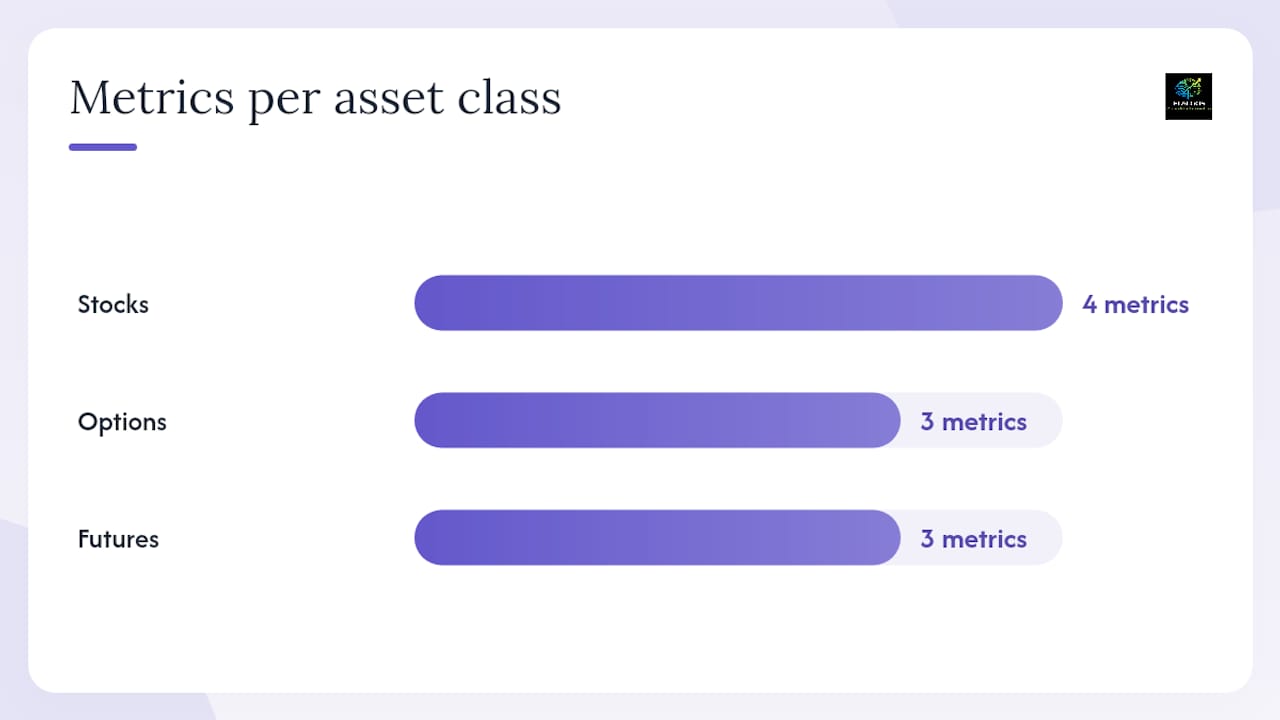
The core problem with generic trading journals is that they measure the wrong things for your specific strategy. An options trader tracking a multi-leg spread needs per-leg entry price, delta at entry, and leg-level P&L at expiration. A futures trader needs tick value, contract size, and session-level drawdown. A stock trader needs expectancy by setup type and average holding period by market condition. A journal that flattens all of these into a single P&L line misses the metrics that actually explain performance.
The table below shows how the key analytics requirements differ by asset class:
| Asset Class | Key Metrics | Typical Import Need | Visualization Required |
|---|---|---|---|
| Stocks | Expectancy, strike rate, per-setup P&L, holding period | Broker auto-import or CSV | Entry/exit chart overlay, equity curve |
| Options | Leg-level P&L, delta/theta at entry, multi-leg breakdown | Broker sync with options data | Multi-leg position map, per-leg chart |
| Futures | Tick-level P&L, contract size, session drawdown | Broker sync or CSV with tick data | Session P&L chart, drawdown curve |
This is why process-oriented trading frameworks emphasize matching your journal to your strategy before anything else. The journal is a measurement tool. If it cannot measure the variables that drive your edge, the data it produces will not help you improve.
Pro Tip: Run a focused 7–14 day trial using only your last 20–30 trades. Import them, run the reports that matter for your asset class, and check whether the journal surfaces the specific metrics you need. If it cannot answer "which setup type has the highest expectancy for me?" by day 7, it is not the right tool.
Protecting your trade data: backup and disaster recovery
Your trade history is a performance record you have built over months or years. Losing it to a vendor shutdown, a subscription lapse, or a data migration error is a real risk, and most traders do not think about it until it happens.
Every journal on this list that offers a paid plan should also offer a data export function. Before you commit to any tool, test the export on day one of your trial. Download your trade history as a CSV or structured file, open it in Excel or Google Sheets, and confirm the fields are complete and readable. If the export is incomplete or locked behind a higher tier, treat that as a disqualifying red flag.
For ongoing protection, export your full trade history at least once a month and store it in a cloud folder (Google Drive, Dropbox, or iCloud) separate from the journal platform. If you use a desktop-based tool like Edgewonk, back up the local database file to a cloud location on the same schedule. Traders who use EI ALGOS or any web-based SaaS journal should also confirm the vendor's data retention policy: what happens to your records if you cancel, and how long does the vendor hold them after account closure?
Manual backup is not glamorous, but it is the only recovery option that works regardless of what the vendor does. A monthly export habit takes five minutes and protects years of data.
Key Takeaways
The strongest trading journal for active self-directed traders is the one that measures the variables driving your specific edge, not just your overall P&L.
| Point | Details |
|---|---|
| Match journal to asset class | Options traders need leg-level P&L; stock traders need expectancy by setup; futures traders need tick-level data. |
| Test import on day one | Broker auto-import reliability is the top reason traders abandon journals; validate it in the first trial session. |
| Require data export | Never commit to a journal that locks or limits your ability to export raw trade history in a portable format. |
| Free tiers exist on most tools | EI ALGOS, Tradervue, TraderSync, TradesViz, TradeZella, and Trademetria all offer free tiers to test before paying. |
| Eialgos for process improvement | EI ALGOS scores decision quality on every setup via its six-factor engine and LIANA assistant, making it the top pick for traders focused on behavioral consistency. |
The metric most traders ignore until it costs them
Most traders evaluate a journal the same way they evaluate a brokerage: by the interface and the price. That is the wrong frame. A journal is a diagnostic tool. Its value is entirely determined by whether it can measure the specific variables that explain why your best trades work and your worst trades fail.
The journals that win long-term are not the ones with the most features. They are the ones that match your asset class, survive your import workflow, and surface the two or three metrics that actually predict your edge. Everything else is noise.
What changed my own approach to journaling was shifting from outcome tracking to decision tracking. Logging whether a trade made money tells you almost nothing about whether you should repeat it. Logging whether the setup met your criteria, whether you sized correctly, and whether you managed the trade according to your plan tells you everything. That shift from P&L log to process record is what separates traders who improve from traders who just accumulate history.
Pick one journal. Run it for 30 days with a defined set of metrics. If it cannot answer your three most important process questions by the end of that period, switch. Do not let tool selection become the reason you never build the habit.
EI ALGOS scores your decisions, not just your trades
Every journal on this list will record your trades. EI ALGOS is the only one that scores the decision behind each trade, using a six-factor behavioral engine that flags the psychological and process errors most traders repeat without realizing it.
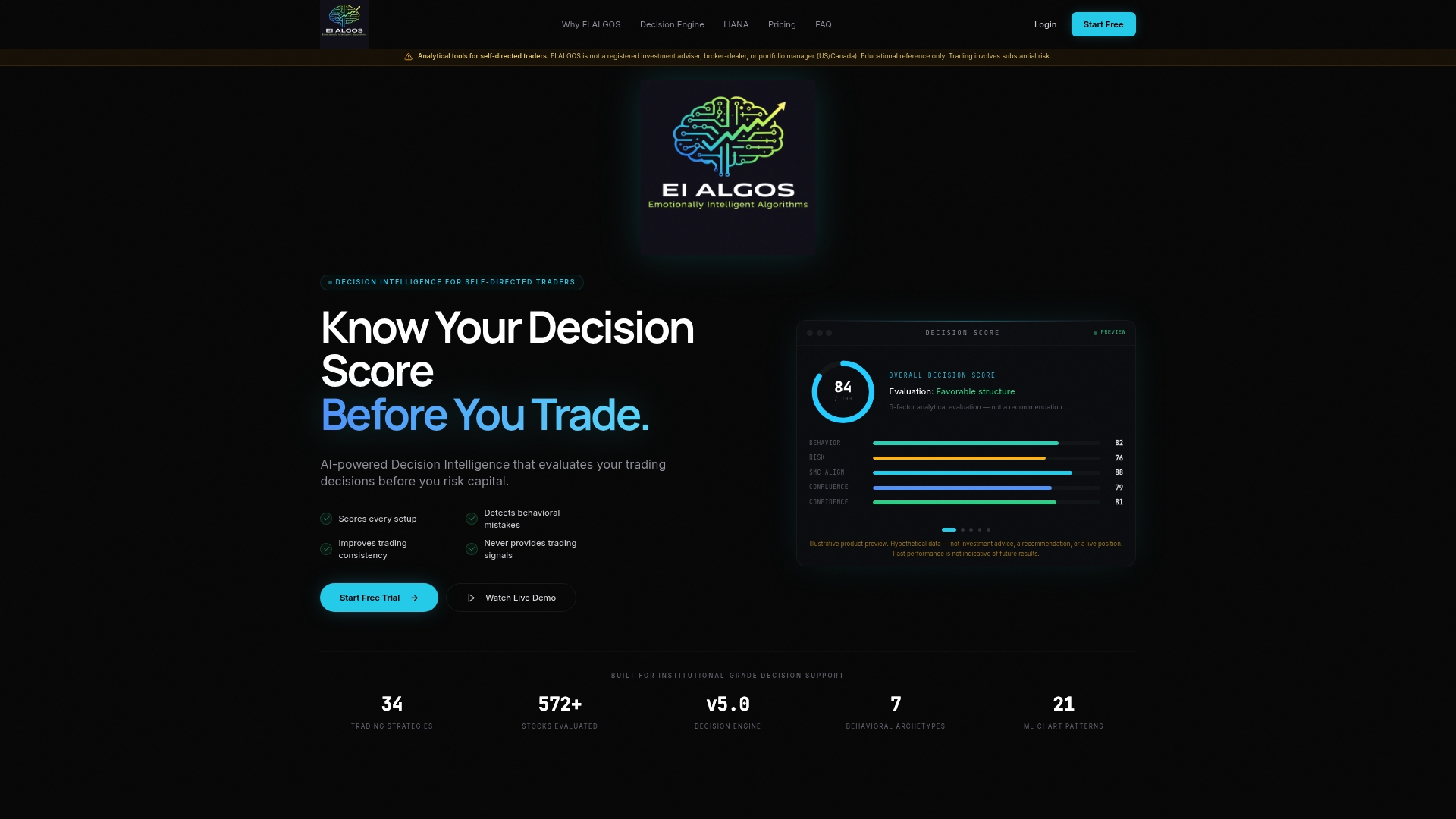
For self-directed traders who trade options, manage multiple setups, or want to build a repeatable process rather than chase signals, EI ALGOS delivers what a standard P&L log cannot: a decision score, behavioral pattern detection, and LIANA's personalized feedback on your specific habits.
- Six-factor decision scoring on every setup
- LIANA AI assistant for process-specific feedback
- Options analysis and live trade management
- Data export so your records stay yours
- Free tier available; no credit card required to start
Start with the free tier and import your last 20 trades. Run the behavioral reports. If your decision patterns look different from your P&L patterns, you have found your edge gap. The EI ALGOS guide walks you through the full onboarding process and how to set up your first decision-scoring session.
Useful sources and further reading
- 5 Best Trading Journals for 2026 - StockBrokers.com
- StockBrokers.com Excel trading journal template (cloudfront asset)
- BBB business listing — Reink Media Group LLC
- B Corporation company listing — Reink Media Group LLC
- Tradervue on StockTwits
- EI ALGOS — Know Your Decision Score Before You Trade
- Process Oriented Trading: An AI-Ready Plan for Self-Directed Traders